Free online monogram maker

Create a personal or wedding monogram from your initials. Start with a ready-made design, refine each element, and download PNG or SVG.

Loading lettering…

Make your initials your own

  • A personal monogram.

    Combine one, two, or three initials into a mark that feels like yours. Compare flowing calligraphy with more structured letters, then balance their size and spacing. A compact monogram works differently from a full signature: it brings a few meaningful letters together in one recognizable composition.

  • Wedding initials, together.

    Bring two names into a shared wedding monogram for stationery, keepsakes, and signs. Try equal-sized initials for a balanced pair or a larger central letter for a family name. Keep the same design across different layouts while adjusting its size to suit each piece.

Calligraphy monogram examples

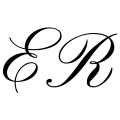
Flowing initials: calligraphy monogram layout example

Flowing initials

A light overlap, two readable letters.

Garden initials: calligraphy monogram layout example

Garden initials

Flowing letters above crossed branches.

A family crest: calligraphy monogram layout example

A family crest

Small initials, a strong family letter.

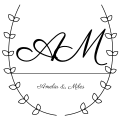
Laurel seal: calligraphy monogram layout example

Laurel seal

A curved name inside fine branches.

Olive keepsake: calligraphy monogram layout example

Olive keepsake

Flowing script above a quiet sprig.

Botanical arch: calligraphy monogram layout example

Botanical arch

A curved name beneath eucalyptus leaves.

Silk ribbon: calligraphy monogram layout example

Silk ribbon

Fine script with a delicate bow.

Chateau initials: calligraphy monogram layout example

Chateau initials

An elegant pair in a shaped border.

Wedding arch: calligraphy monogram layout example

Wedding arch

A named monogram with room to breathe.

How to design a monogram

  1. Choose your initials

    Start with one letter, a pair of initials, or a three-letter name. Decide which letter should stand out.

  2. Pick a layout

    Choose one of ten layouts or browse 72 ready-made designs. Replace the example initials with your own before refining the composition.

  3. Refine the lettering

    Select letters to adjust size, rotation, and position. Open Frame for decorative borders and Canvas for Fill and the clearance between overlapping strokes.

  4. Prepare your file

    Download a 1200 × 1200 PNG, save an outlined SVG, or copy the PNG. Turn Fill off when you need a transparent background.

Refine your monogram

What you seeWhat to adjustRefined example
Letters merge into one shapeMove them apart first, then add a little Gap at intersectionsER initials with readable intersections
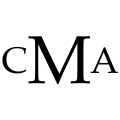
One initial dominatesSelect that letter and reduce SizeCMA initials with balanced proportions
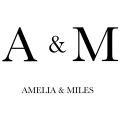
The name competes with the initialsSelect the name and reduce Size or move itA and M with a small supporting name
The frame feels heavySelect the frame and reduce Size, which controls its thicknessJRM family crest with a delicate frame
A white box appears around the artworkTurn Fill off before exportingBotanical AM on a transparent background
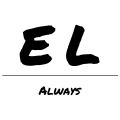
Fine details disappear at small sizesChoose simpler lettering and review at the intended sizeBold readable EL initials
How to make a monogram that stays readable

Monogram questions

  • What is a monogram?

    A monogram combines initials into a decorative mark. It can use a single letter, a pair, or several initials arranged as one composition.

  • How is a monogram different from a signature?

    A monogram focuses on initials and their arrangement. A signature usually follows the handwriting or lettering of a name. Use our signature generator for typed or hand-drawn signatures.

  • Which order should three initials go in?

    For equal-sized letters, first, middle, and last name order is common. In a traditional design with a larger center letter, the surname initial often goes in the center. Choose the convention that fits the person and context.

  • How do I choose initials for a wedding monogram?

    You can pair the partners’ first initials, or use a shared surname initial if that suits you. There is no need to assume either partner is changing their name.

  • Can I make a monogram with one letter?

    Yes. A single decorative initial can work well for stationery, bookplates, and gift labels. The shape of the letter and the space around it become especially important.

  • What is an interlocking monogram?

    The Interlock layout brings initials close together. In this editor, earlier letters cover later letters; Gap creates clearance at their intersections. It does not alternate over-and-under crossings automatically.

  • What is a split monogram?

    A split monogram places a name or short line of text through a gap in a large initial. It is a different composition from a row of initials or a stacked design.

  • Which fonts work well for monograms?

    Calligraphy fonts offer flowing strokes and flourishes, while serif or simple lettering can feel more structured. Compare the actual initials: a font that works for one pair may create awkward collisions with another.

  • Can I use a monogram for embroidery?

    A monogram can be the starting artwork, but PNG or SVG is not a machine embroidery file. An embroiderer must digitize stitches and may simplify fine details for the fabric and size.

  • Is SVG suitable for cutting machines?

    Outlined SVG is a useful starting format for compatible cutting software. Check that shapes join as intended, remove unwanted overlaps, and avoid details too small for your material. Test a cut before producing a batch.

  • How large should a printed monogram be?

    Choose the size for the object it will appear on, then print a sample at actual size. Fine script may need larger lettering or simpler details on small labels and tags.

  • Can I use initials as a business logo?

    You can develop initials into a logo concept, but check font licensing and whether the design is distinct from existing marks. A monogram generator does not establish trademark rights.

Monogram ideas

  • Wedding stationery.

    Place a shared initial design on invitations, envelopes, and thank-you cards. Keep small details open enough to reproduce clearly in print.

  • Personal stationery.

    Add a quiet mark to notecards and letterheads. A single calligraphic initial gives a personal touch without competing with the message.

  • Gift labels.

    Personalize a gift tag with the recipient’s initials. Leave space around the monogram so it remains clear on a small label.

  • Wedding signs.

    Use a larger version on a welcome sign or seating-plan header. Keep names and practical directions separately readable.

  • Clothing and textiles.

    Explore initials for a robe, tote, or shirt. Embroidery needs separate digitizing and may require simpler, heavier letter shapes.

  • Stickers and decals.

    Prepare a compact mark for packaging or personal items. For cutting, check joined shapes and the smallest gaps before production.

  • Books and keepsakes.

    Create an initial mark for a bookplate, album, or journal cover. Try a restrained frame for a design that works across different covers.

  • Personal branding.

    Explore an initials-based mark for a portfolio or business card. Check distinctiveness and font licensing before using it commercially.

  • Event details.

    Repeat a shared monogram on menus, favor tags, and place-card backs. Use one consistent design to bring the smaller pieces together.

Monogram editor features

  • 72 ready-made designs.

    Explore 24 simple designs, 24 framed compositions on transparent backgrounds, and 24 designs with a fill. Applying a preset replaces the current design, including its initials; use Undo to return.

  • Ten layouts.

    Try a curved-name seal, a family crest, a couple joined with an ampersand, or a name banner. Choose a composition, then select individual elements to refine it.

  • A varied font library.

    Compare classic serif lettering, wedding and flourish scripts, handwritten styles, gothic, manga, comics, and holiday fonts. Judge each font with your own initials.

  • Individual letter controls.

    Select a letter and change its Size, Angle, X, and Y. Drag it in the preview or use its handles for size and rotation.

  • Names and dividers.

    Seven layouts include a separate name. Select the name to move, resize, or rotate it. The Underline divider can be selected and adjusted too.

  • Precise keyboard movement.

    With an element selected and the preview focused, arrow keys move it by one canvas unit. Hold Shift for ten-unit steps. Click empty space to clear the selection.

  • Readable overlaps.

    Earlier initials cover later ones. Gap adds clearance around those intersections; move the letters themselves to change their spacing.

  • 23 frame styles.

    Choose geometric borders, botanical wreaths, branches, a bow, or a crest in Frame. Match the border to your lettering, or choose No frame for a simpler design.

  • Flexible frame proportions.

    Drag a corner to resize the frame without changing its proportions. Use the side handles to adjust width and height independently and give your initials room to breathe.

  • Adjustable border weight.

    Select the frame and use Size to change its line thickness. Balance a fine border with delicate script or give heavier lettering a stronger outline.

  • Canvas controls.

    Fill and Gap share the Canvas popover, with Frame alongside it. Choose No frame to remove the border, or switch Fill off for a transparent background.

  • Ink and background colors.

    Use color swatches or the browser’s custom color picker. Ink colors the artwork together. Turn Fill off for a transparent background.

  • Undo and redo.

    On desktop, use Undo and Redo to step back through changes to your composition, lettering, and colors. Compare alternatives without rebuilding the design from scratch.

  • Live adjustments.

    Sliders and numeric fields update the preview immediately. On a touch screen, select and drag elements directly, then refine their values in the lower toolbar.

  • 1200-pixel PNG.

    Download a square 1200 × 1200 PNG. Keep transparency for placement over another design or enable Fill for a solid background.

  • Outlined SVG.

    Export scalable letter outlines without asking the recipient to install the font. Inspect masks and fine details in the application where you will use the file.

  • Copy as an image.

    Copy the PNG to a compatible clipboard for pasting into another app. If the browser cannot copy an image, use Download PNG.

  • Local artwork generation.

    Font files load from our library, while the monogram is built and exported in your browser. Your initials are not sent to a rendering server.